Tuesday, 10 January 2017

NetNewsWire 4 mac restore

Restoring is easy, a fresh install may proof challenging.

If you didn't create an export (OPML) then you may have to reimport the subscriptions from the preferences out of your timemachine backup.

In NetNewsWire 3, restore the application preferences within ~/Library/Application Support:
~/Library/Application Support/NetNewsWire/

In NetNewsWire 4, this changed. The preferences are now under ~/Library/Containers:
~/Library/Containers/com.blackpixel.netnewswire/

Procedure is the same:
  • Quit the application
  • In finder go to the folder (Menu > Go > Go to folder) and type ~/Library press enter an browse to the correct folder
  • Activate Time Machine
  • Restore
  • Confirm to overwrite the existing folder

Tuesday, 12 January 2016

WebLogic, Mission Control, remote Flight Recordings and iptables

Getting this mix to work under JDK8 is not well documented. There are a few limitations you have to run into first:

  • RMI data port is normally dynamic, unless configured to be fixed
  • RMI passwords are not set (obviously)
  • RMI access profile is insufficient for MissionControl
  • jmx.mbeanserver is started with insufficient rights for MissionControl

Here the sequence to get it working under WebLogic 12, in combination with JDK8

Open the iptables sufficiently:
## 8001-8010 = JVM open ports for rmi, Mission Control
## 8101-8110 = JVM open ports for rmi data, Mission Control
-A INPUT -p tcp -m state --state NEW -m tcp --dport 8001:8010 -j ACCEPT
-A INPUT -p tcp -m state --state NEW -m tcp --dport 8101:8110 -j ACCEPT

Add the following startup options to the Managed Server, in case no passwords are required:
-XX:+UnlockCommercialFeatures 
-XX:+FlightRecorder 
-Dcom.sun.management.jmxremote.port=8001 
-Dcom.sun.management.jmxremote.rmi.port=8101 
-Dcom.sun.management.jmxremote.ssl=false 
-Djavax.management.builder.initial=weblogic.management.jmx.mbeanserver.WLSMBeanServerBuilder 
-Dcom.sun.management.jmxremote.authenticate=false

Add the following startup options to the Managed Server, in case passwords are required:
-XX:+UnlockCommercialFeatures -XX:+FlightRecorder 
-Dcom.sun.management.jmxremote.port=8001 
-Dcom.sun.management.jmxremote.rmi.port=8101 
-Dcom.sun.management.jmxremote.ssl=false  
-Djavax.management.builder.initial=weblogic.management.jmx.mbeanserver.WLSMBeanServerBuilder 
-Dcom.sun.management.jmxremote.authenticate=true

Now we need the rmi access and password file set. The default access file is insuffient. Modify the file
$jdk_home/jre/lib/management/jmxremote.access
monitorRole   readonly
controlRole   readwrite \
              create javax.management.monitor.*,javax.management.timer.* \
              create com.sun.management.MissionControl \
              unregister

And we need to set a password, in case we set -Dcom.sun.management.jmxremote.authenticate=true, in file $jdk_home/jre/lib/management/jmxremote.password
monitorRole YourMonitorPasswordHere
controlRole YourControlPasswordHere

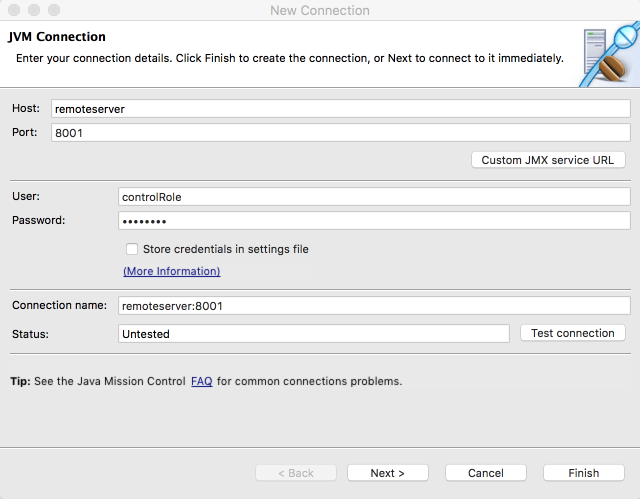
Now, you can connect and make Flight Recordings from remote:
Tuesday, 10 January 2017

NetNewsWire 4 mac restore

Restoring is easy, a fresh install may proof challenging.

If you didn't create an export (OPML) then you may have to reimport the subscriptions from the preferences out of your timemachine backup.

In NetNewsWire 3, restore the application preferences within ~/Library/Application Support:
~/Library/Application Support/NetNewsWire/

In NetNewsWire 4, this changed. The preferences are now under ~/Library/Containers:
~/Library/Containers/com.blackpixel.netnewswire/

Procedure is the same:
  • Quit the application
  • In finder go to the folder (Menu > Go > Go to folder) and type ~/Library press enter an browse to the correct folder
  • Activate Time Machine
  • Restore
  • Confirm to overwrite the existing folder

Tuesday, 12 January 2016

WebLogic, Mission Control, remote Flight Recordings and iptables

Getting this mix to work under JDK8 is not well documented. There are a few limitations you have to run into first:

  • RMI data port is normally dynamic, unless configured to be fixed
  • RMI passwords are not set (obviously)
  • RMI access profile is insufficient for MissionControl
  • jmx.mbeanserver is started with insufficient rights for MissionControl

Here the sequence to get it working under WebLogic 12, in combination with JDK8

Open the iptables sufficiently:
## 8001-8010 = JVM open ports for rmi, Mission Control
## 8101-8110 = JVM open ports for rmi data, Mission Control
-A INPUT -p tcp -m state --state NEW -m tcp --dport 8001:8010 -j ACCEPT
-A INPUT -p tcp -m state --state NEW -m tcp --dport 8101:8110 -j ACCEPT

Add the following startup options to the Managed Server, in case no passwords are required:
-XX:+UnlockCommercialFeatures 
-XX:+FlightRecorder 
-Dcom.sun.management.jmxremote.port=8001 
-Dcom.sun.management.jmxremote.rmi.port=8101 
-Dcom.sun.management.jmxremote.ssl=false 
-Djavax.management.builder.initial=weblogic.management.jmx.mbeanserver.WLSMBeanServerBuilder 
-Dcom.sun.management.jmxremote.authenticate=false

Add the following startup options to the Managed Server, in case passwords are required:
-XX:+UnlockCommercialFeatures -XX:+FlightRecorder 
-Dcom.sun.management.jmxremote.port=8001 
-Dcom.sun.management.jmxremote.rmi.port=8101 
-Dcom.sun.management.jmxremote.ssl=false  
-Djavax.management.builder.initial=weblogic.management.jmx.mbeanserver.WLSMBeanServerBuilder 
-Dcom.sun.management.jmxremote.authenticate=true

Now we need the rmi access and password file set. The default access file is insuffient. Modify the file
$jdk_home/jre/lib/management/jmxremote.access
monitorRole   readonly
controlRole   readwrite \
              create javax.management.monitor.*,javax.management.timer.* \
              create com.sun.management.MissionControl \
              unregister

And we need to set a password, in case we set -Dcom.sun.management.jmxremote.authenticate=true, in file $jdk_home/jre/lib/management/jmxremote.password
monitorRole YourMonitorPasswordHere
controlRole YourControlPasswordHere

Now, you can connect and make Flight Recordings from remote: